# Learn how to use Git and GitHub in a team like a pro (part 2)
In the previous part of this tutorial, we learned how Harry and Hermione decided to build a SaaS app to allow people to build their own potions online and share them with the rest of the world. They named it **Potionfy**.
Hermione created a remote repository, then an `issue` to address the task of building a landing page, and how Harry worked on that `issue` locally and created a `pull request` once he finished working on it.
You can read the first part of the tutorial [here](https://blog.damiandemasi.com/learn-how-to-use-git-and-github-in-a-team-like-a-pro).
Now, we are going to see:
- how Hermione reviews Harry's code,
- how the code is merged on the master branch,
- the decision of using a `develop` branch,
- how the team works in the develop branch and merges changes into main,
- and how the team solves merge conflicts.
 ---
## Code review
### Step 1: Creating a review
Hermione has finished with her marketing and promotion tasks, and she now has time to review Harry's code. In order to do so, she opens the GitHub repository and clicks on the `Pull requests` tab to find Harry's pull request.

After clicking on it, she then clicks on the `Commits` tab, and finally in Harry's last commit (this is just one way of accessing the files modified on the pull request).
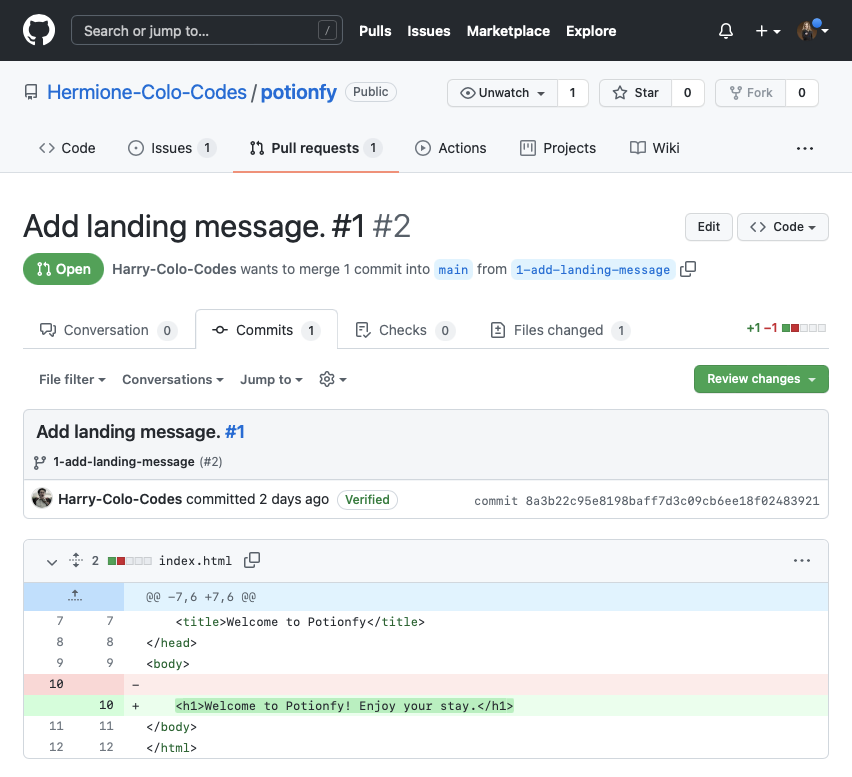
She is not entirely convinced about the `
---
## Code review
### Step 1: Creating a review
Hermione has finished with her marketing and promotion tasks, and she now has time to review Harry's code. In order to do so, she opens the GitHub repository and clicks on the `Pull requests` tab to find Harry's pull request.

After clicking on it, she then clicks on the `Commits` tab, and finally in Harry's last commit (this is just one way of accessing the files modified on the pull request).

She is not entirely convinced about the `` code, so she clicks on the plus icon that appears when she hovers that line of code, and writes a comment to Harry. Finally, she clicks on the `Start a review` button.
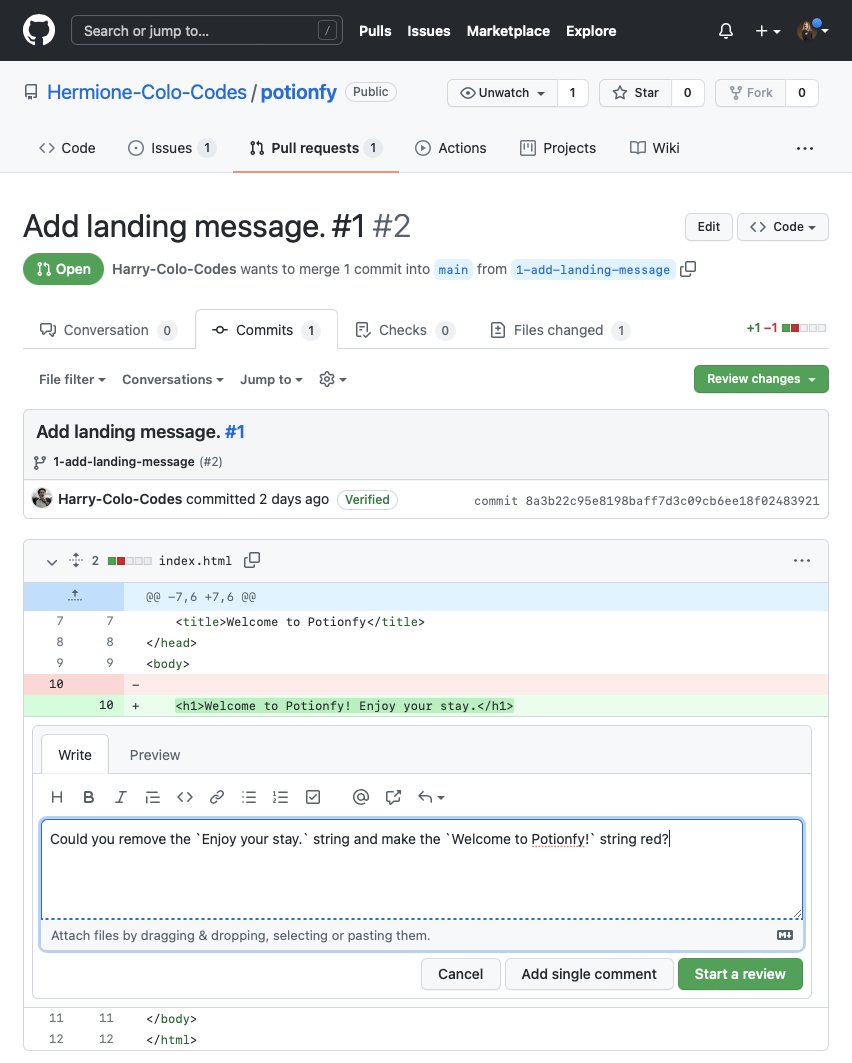
As she has no other comments about the code, she now clicks on the `Review changes` button to make the review visible to the rest of the team.

You can find more information about making reviews in this [Reviewing proposed changes in a pull request](https://docs.github.com/en/pull-requests/collaborating-with-pull-requests/reviewing-changes-in-pull-requests/reviewing-proposed-changes-in-a-pull-request) article.
### Step 2: addressing the review and creating a code change
Harry checks his pull request and finds a new conversation there: Hermione's review.

Harry answers Hermione's comment and clicks on the `Resolve conversation` button.

Now that the conversation is resolved, Hermione can submit the review indicating that **there are requested changes** so Harry can actually work on them.
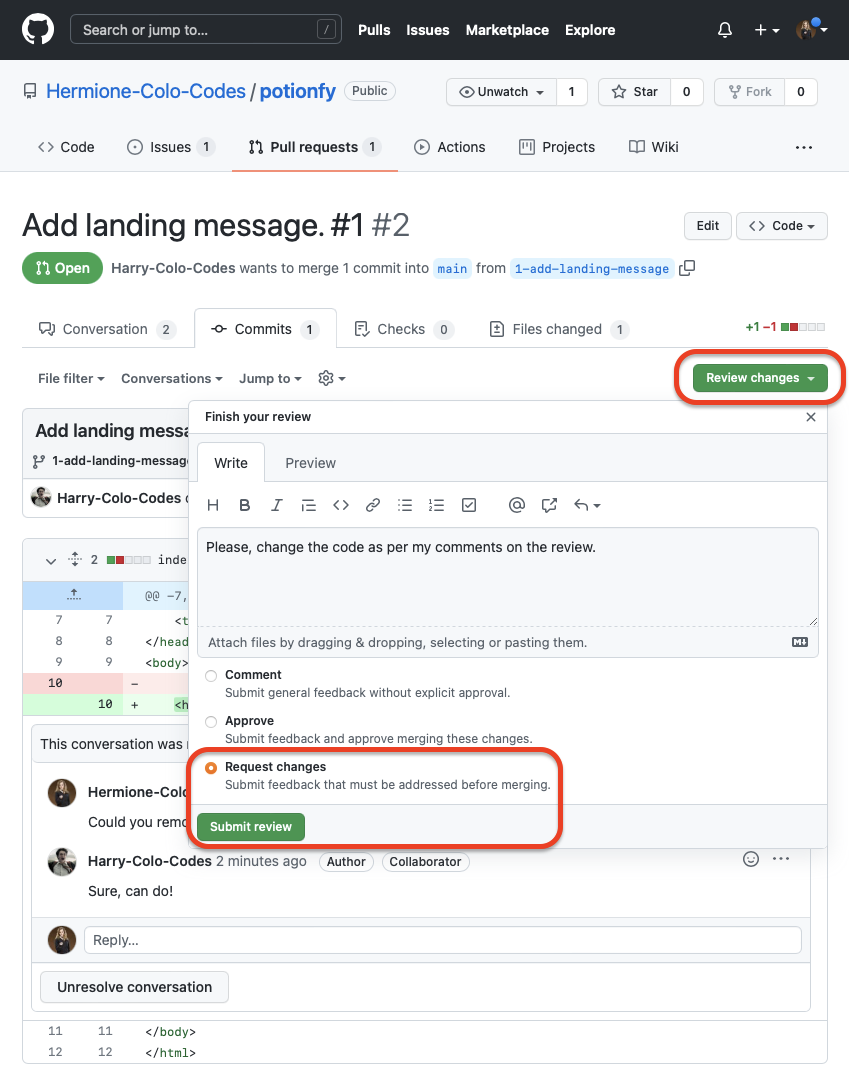
**Note:** this is just one version of the review process that can be achieved with GitHub and it can differ from the actual way your team chooses to handle them.
Harry checks the pull request again and finds that it has `Changes requested`.

### Step 3: implementing the changes
As Harry likes to work locally, he continues working on the branch he had created in order to implement the code changes.
```bash
$ git checkout 1-add-landing-message
```
Once he is sure he is working on the correct branch, he makes the changes in the `index.html` file.

**Note:** for simplicity sake, we are not creating a separate CSS file here.
Once Harry finishes tweaking the code, he stages the changes, commits them (making sure to include the `id` of the issue because he is still working on it), and pushes them to GitHub.
```bash
$ git add -A
$ git commit -m "Add colour and remove text. #1"
$ git push
```
### Step 4: merging the pull request
Now it's Hermione's turn. She goes to the pull request and finds a new commit: the one Harry did and pushed to GitHub.

She then clicks on the `Files changed` tab and finds the ones that she suggested implemented on the `index.html` file.

As she is satisfied with the changes, she proceeds to approve them by clicking on the `Review changes` button and selecting the `Approve` option.
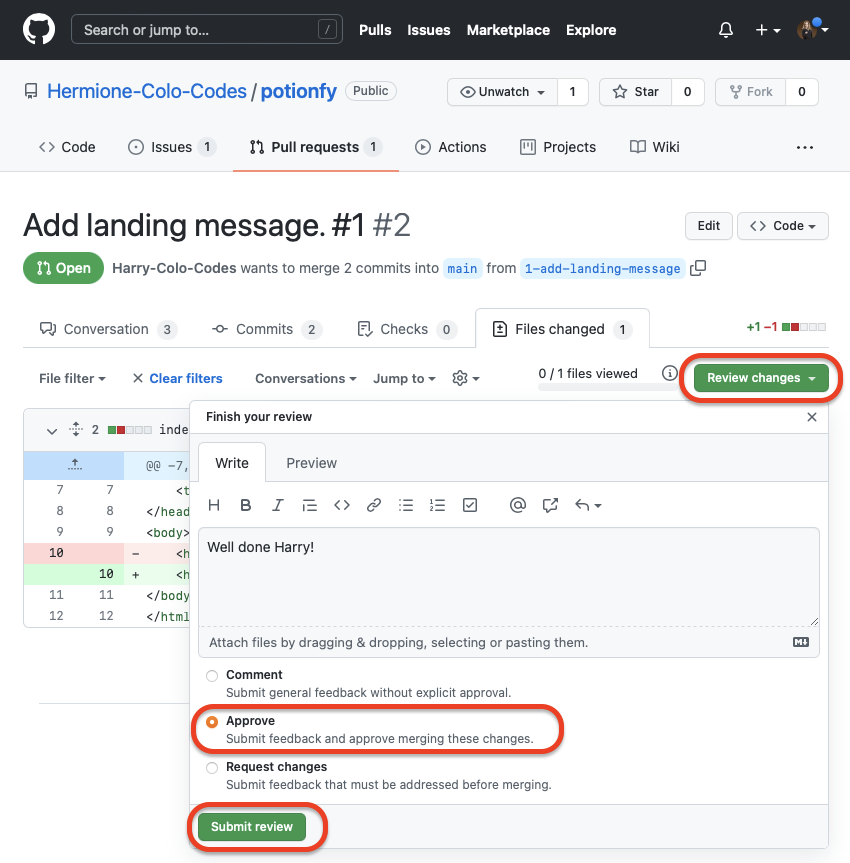
Harry sees that his pull request was approved by Hermione, and he proceeds to merge it into the main branch of the project.
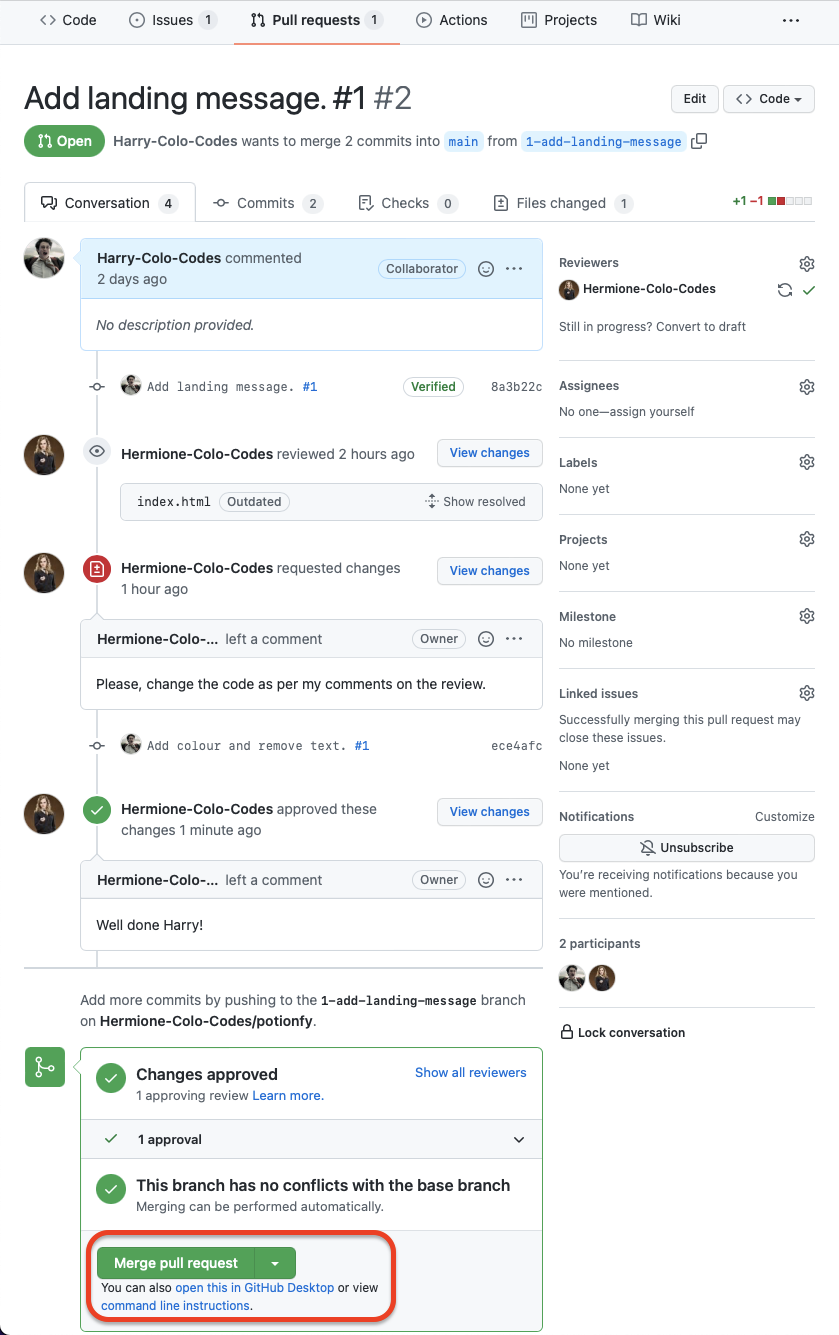
He decided not to delete the branch, as he wants to leave it there for future reference (although it would be a good idea to delete it).
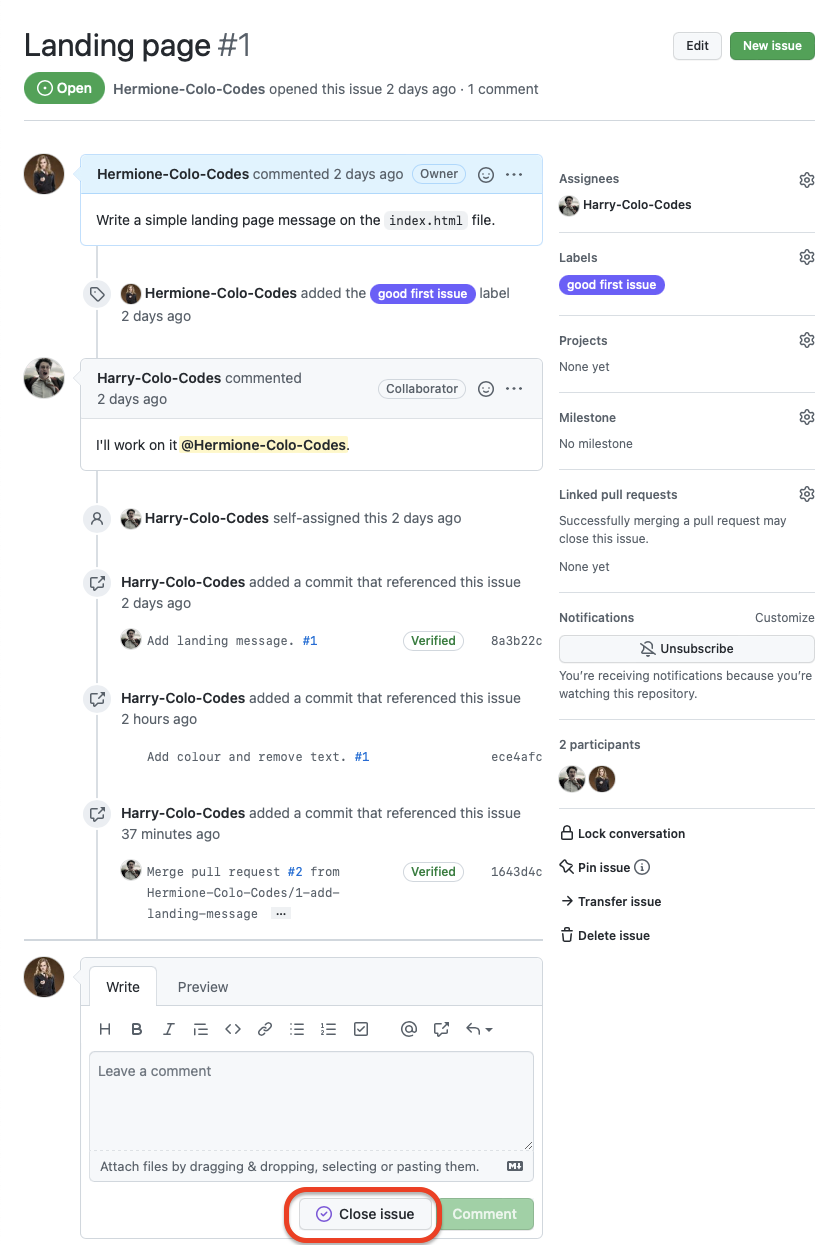
As Hermione is satisfied with how the issue was solved, she proceeds to close it by going to the `Issues` tab and clicking on the `Close issue` button.
If you want to see a graphical representation of the whole process up to this point, you can click on the `Insights` tab and then on the `Network` option. You will be able to actually see how the branching and merging were performed.

---
## Using a `develop` branch
When working with real projects, merging changes into the main branch like you saw up to this point is not recommended. Instead of working directly with the `main` branch (often called `production`), you will be working with a `develop` branch. You will be branching issues out of that `develop` branch and merging them back into the `develop` branch. Once a group of issues have been solved, that `develop` branch will be merged into the `main` (or `production`) branch, usually denoting a version change in the app.

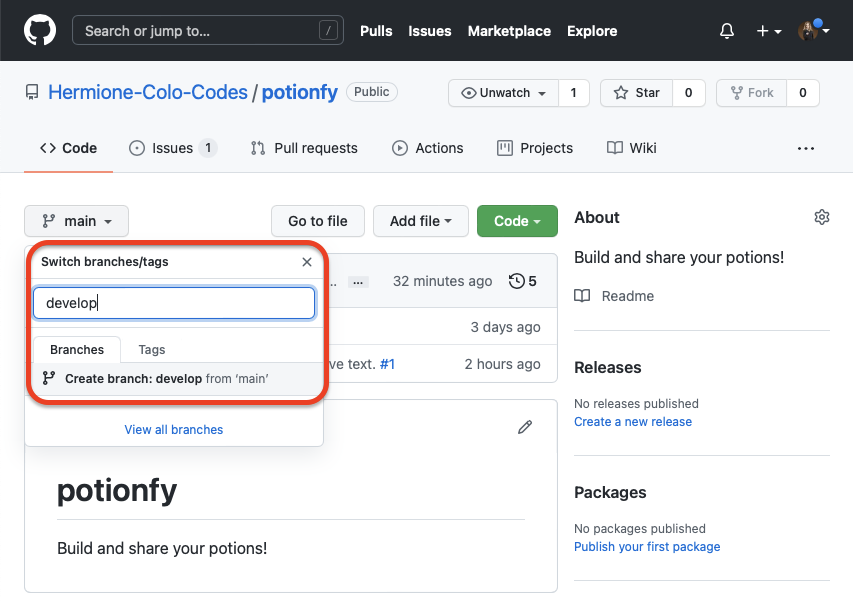
Hermione is aware of this, and now that the landing page is live and accessible to customers, she decided to preserve that _production environment_ and work on a development branch. In order to do so, she creates a `develop` branch out of the `main` one, so she and Harry can work on that branch without impacting the production environment.
---
## Merge conflicts
Hermione wants to add a new feature to the landing page: a form to capture clients' emails. In order to do so, she creates a new issue.

Once the issue is created, Harry decides to start working on it. To do so, **he branches out from the `develop` branch** (by selecting that branch on the GitHub interface) a new one called `3-email-form` (including the issue number at the front to make it clear how this branch will relate to the issues).

He then pulls that branch locally and starts working on it.
```bash
$ git pull
$ git checkout 3-form
```
Harry decides to include a simple form into the `index.html` file:
```html
```
**Note:** This code is just to exemplify how Harry is working on a file and it's not how this type of form could actually be built.
Harry stages and commits his changes locally using the `Contact form. #3` message.
```bash
$ git add -A
$ git commit -m "Contact form. #3"
$ git push
```
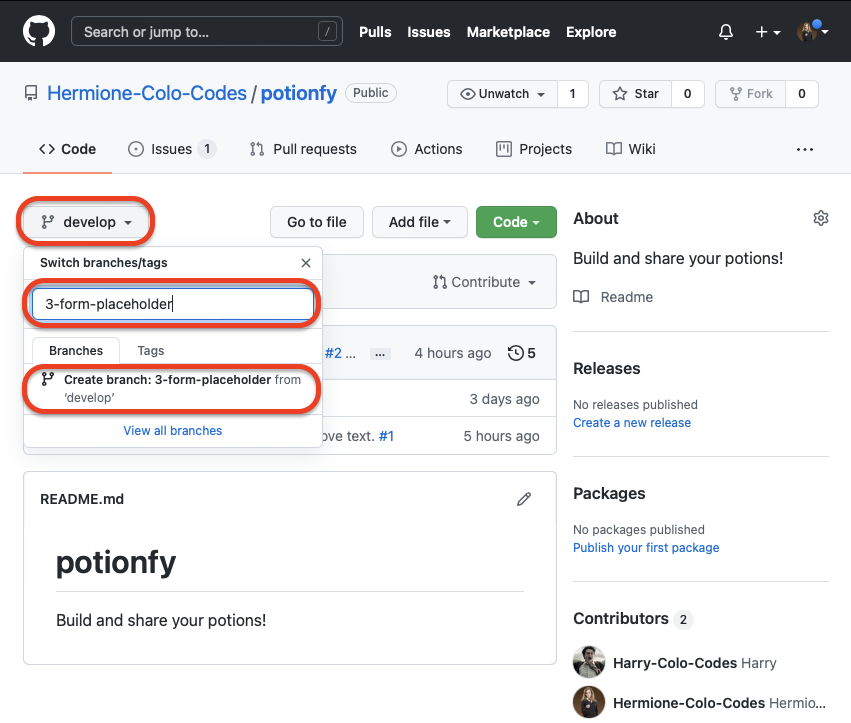
 Before Harry could create a **new pull request**, Hermione decides to build a placeholder for the form on the `index.html` file on her own. In order to do so, **she creates a new branch** out of `develop` called `3-email-form-placeholder`.
To work on the `index.html` file, she uses the GitHub online code editor (basically, a VSCode for the web). In order to open it, she just presses the `.` key on her keyboard and the GitHub page is transformed into a VSCode interface (like magic 😉).

She then proceeds to add the following code to the file:
```html
```
After saving the file, she commits the changes right there on her browser window by using VSCode graphical interface:
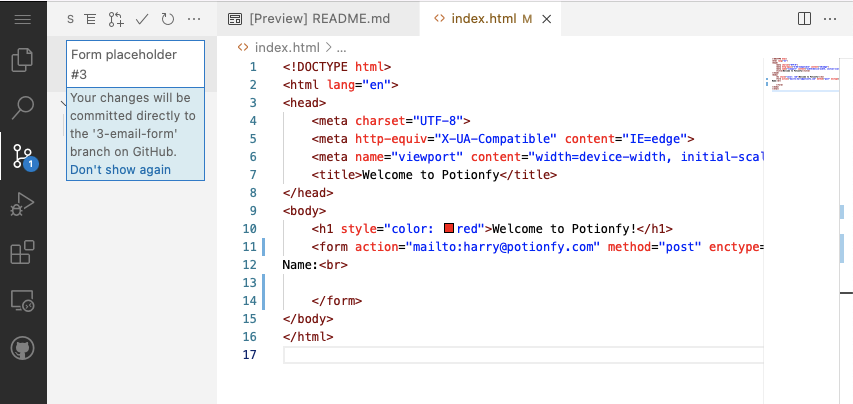
Once the commit is complete, she opens GitHub again and decides to create her own pull request and merge her changes to the `develop` branch.


Before Harry could create a **new pull request**, Hermione decides to build a placeholder for the form on the `index.html` file on her own. In order to do so, **she creates a new branch** out of `develop` called `3-email-form-placeholder`.

To work on the `index.html` file, she uses the GitHub online code editor (basically, a VSCode for the web). In order to open it, she just presses the `.` key on her keyboard and the GitHub page is transformed into a VSCode interface (like magic 😉).

She then proceeds to add the following code to the file:
```html
```
After saving the file, she commits the changes right there on her browser window by using VSCode graphical interface:

Once the commit is complete, she opens GitHub again and decides to create her own pull request and merge her changes to the `develop` branch.


 On the other hand, Harry also decides to create a `pull request` to merge his changes into the `develop` branch.
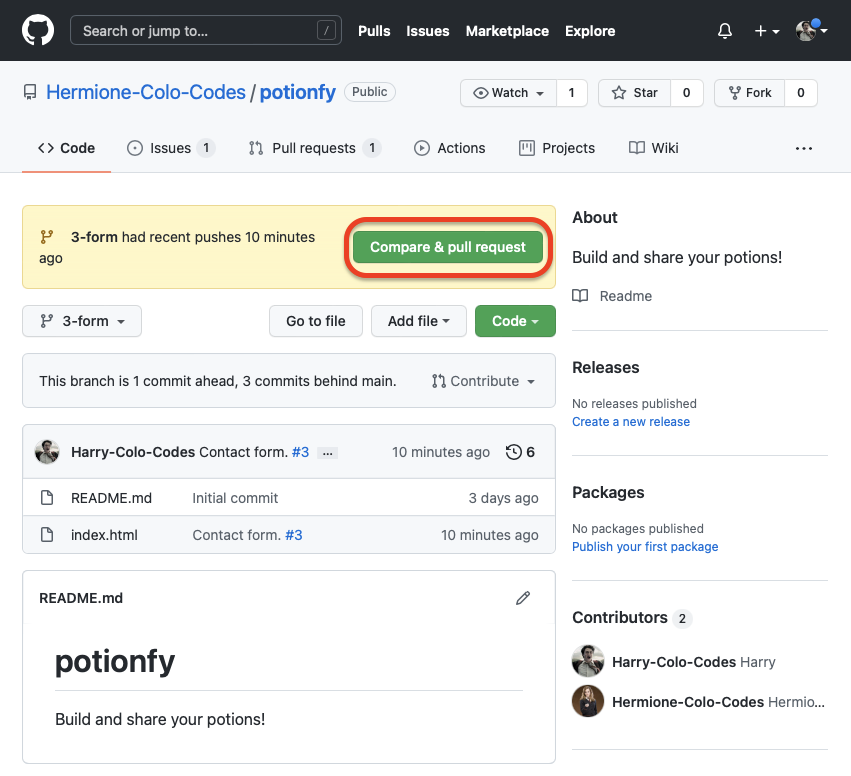
At this point, GitHub lets him know that his pull request won't be able to merge automatically to the `develop` branch.

**Harry supposes that his branch is no longer reflecting the state of the `develop` branch and that the `develop` branch has changed because someone else merged changes affecting the `index.html` file on which he was working on**. Nevertheless, he proceeds to create a pull request.
What he sees next is GitHub's way of letting him know that there is a conflict affecting the file he modified. He proceeds to click on the `Resolve conflicts` button.

He can now see that the `index.html` indeed was modified, and the changes made to that file are affecting the lines he himself modified.
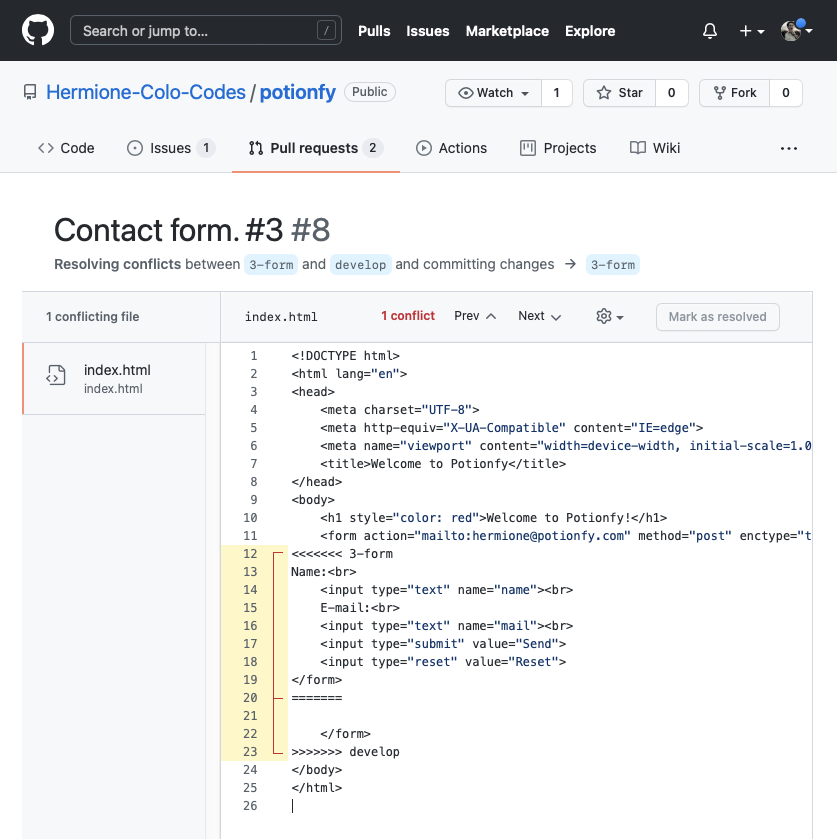
_For more information about solving conflicts, you can read the [Resolving a merge conflict on GitHub](https://docs.github.com/en/pull-requests/collaborating-with-pull-requests/addressing-merge-conflicts/resolving-a-merge-conflict-on-github) article._
Harry proceeds to modify the file directly on the GitHub site to remove the conflicting changes and then clicks on the `Mark as resolved` button.
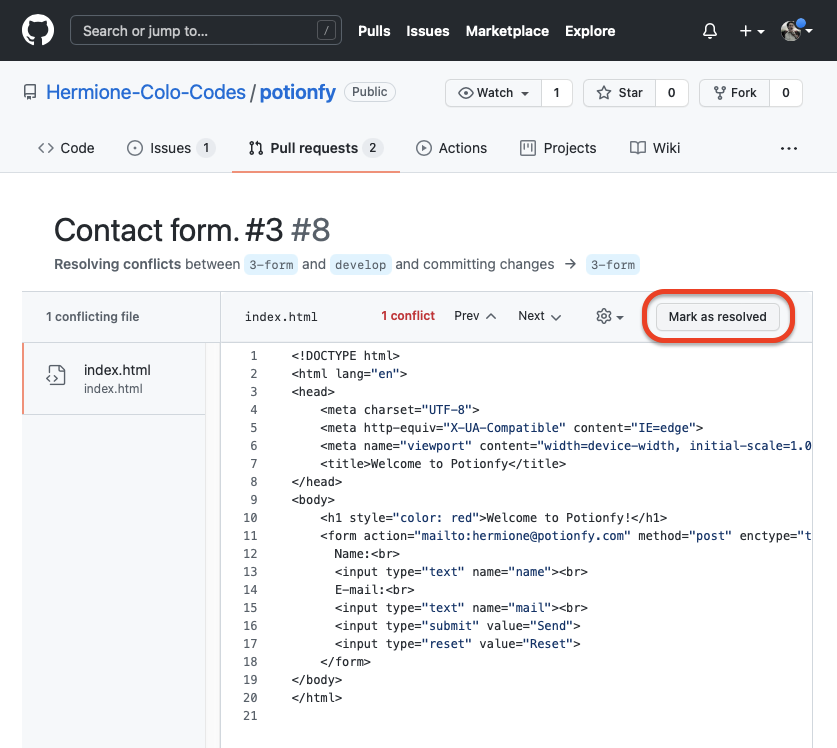
Once the conflict is marked as resolved, he clicks on the `Commit merge` button.

Finally, his branch was conflict-free and he can merge his pull request (assuming Hermione reviewed his code and approved it, just as she did earlier).

Conflicts ofter arise when teammates are working on different branches that affect a common file. A great way to prevent merge conflicts is to do a `pull` request on the `develop` branch, merge that updated `develop` branch into the branch you are working on, and then do a `push` followed by a `pull request`.
```bash
$ git branch
x-my-branch # This is an example name
$ git checkout develop
$ git pull
$ git checkout x-my-branch
$ git merge develop
# You make some changes on the files of the x-my-branch branch
$ git add -A
$ git commit -m ""
$ git push
```
## Final thoughts
After working on their landing page, Harry and Hermione managed to get lots of email addresses from potential customers and continued developing their MVP. They managed to get funding from a local venture capital firm, and they are now in the process of hiring other developers to launch Potionfy to the public. I'm sure they would love to take a look at your resume to consider you for a position in their company, so good luck!
On the other hand, Harry also decides to create a `pull request` to merge his changes into the `develop` branch.

At this point, GitHub lets him know that his pull request won't be able to merge automatically to the `develop` branch.

**Harry supposes that his branch is no longer reflecting the state of the `develop` branch and that the `develop` branch has changed because someone else merged changes affecting the `index.html` file on which he was working on**. Nevertheless, he proceeds to create a pull request.
What he sees next is GitHub's way of letting him know that there is a conflict affecting the file he modified. He proceeds to click on the `Resolve conflicts` button.

He can now see that the `index.html` indeed was modified, and the changes made to that file are affecting the lines he himself modified.

_For more information about solving conflicts, you can read the [Resolving a merge conflict on GitHub](https://docs.github.com/en/pull-requests/collaborating-with-pull-requests/addressing-merge-conflicts/resolving-a-merge-conflict-on-github) article._
Harry proceeds to modify the file directly on the GitHub site to remove the conflicting changes and then clicks on the `Mark as resolved` button.

Once the conflict is marked as resolved, he clicks on the `Commit merge` button.

Finally, his branch was conflict-free and he can merge his pull request (assuming Hermione reviewed his code and approved it, just as she did earlier).

Conflicts ofter arise when teammates are working on different branches that affect a common file. A great way to prevent merge conflicts is to do a `pull` request on the `develop` branch, merge that updated `develop` branch into the branch you are working on, and then do a `push` followed by a `pull request`.
```bash
$ git branch
x-my-branch # This is an example name
$ git checkout develop
$ git pull
$ git checkout x-my-branch
$ git merge develop
# You make some changes on the files of the x-my-branch branch
$ git add -A
$ git commit -m ""
$ git push
```
## Final thoughts
After working on their landing page, Harry and Hermione managed to get lots of email addresses from potential customers and continued developing their MVP. They managed to get funding from a local venture capital firm, and they are now in the process of hiring other developers to launch Potionfy to the public. I'm sure they would love to take a look at your resume to consider you for a position in their company, so good luck!
 ---
🗞️ **NEWSLETTER -** _If you want to hear about my latest articles and interesting software development content, [subscribe to my newsletter](https://mailchi.mp/22b236f812b1/subscribe-to-newsletter)._
🐦 **TWITTER -** *Follow me on [Twitter](https://twitter.com/DamianDemasi).*
---
🗞️ **NEWSLETTER -** _If you want to hear about my latest articles and interesting software development content, [subscribe to my newsletter](https://mailchi.mp/22b236f812b1/subscribe-to-newsletter)._
🐦 **TWITTER -** *Follow me on [Twitter](https://twitter.com/DamianDemasi).*